
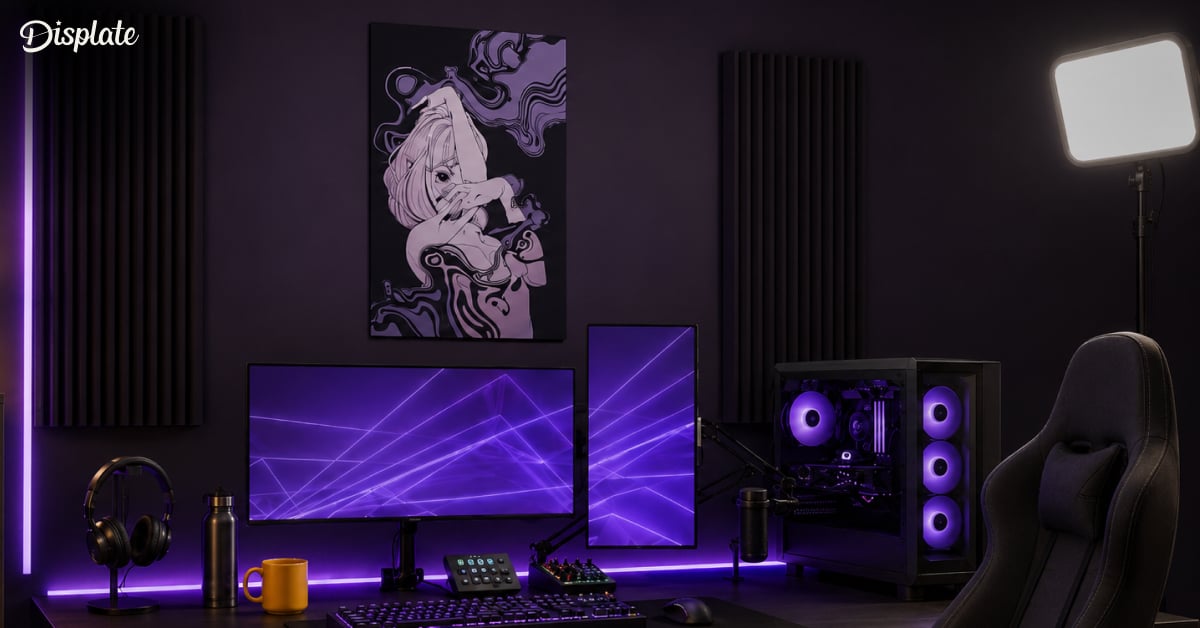
Gaming is already awesome, but gaming while streaming? That’s a whole new level of power-up.
Building your own game streaming setup isn’t just about flexing your gear; it’s about crafting your digital stage. Whether you’re chasing Twitch stardom, hanging out on YouTube Live, or just vibing with a few friends online, your setup can make or break the show.
The good news? You don’t need a NASA-grade rig or esports sponsorship to pull it off. With the right gear, a smart layout, and a bit of streamer savvy, you can build a setup that looks professional, performs smoothly, and feels 100% you.
Here’s how to make it happen.
Why a Good Streaming Setup Matters
A great stream is more than gameplay; it’s performance, presentation, and personality. Viewers aren’t just watching your game; they’re hanging out with you.
A poor mic, glitchy visuals, or dim lighting? That’s like trying to speedrun with lag. Even small upgrades can transform your stream from amateur hour to professional-grade.
Think of it this way: your streaming setup is your command center, and every piece of it matters.
Step 1: Pick Your Streaming Platform and Purpose
Before diving into wires, specs, and mic stands, you need to know where you’re going live, and why.
Each platform has its own perks, and knowing your end goal helps shape your setup.
| Platform: | Strength: | Ideal For: |
| Twitch | Huge gaming audience and strong discovery tools. | Gamers building community. |
| YouTube Live | Best for longer sessions and content archiving. | Variety streamers and video creators. |
| Kick | High creator revenue share. | Experimenters and indie streamers. |
| Facebook Gaming | Built-in social reach. | Casual streamers sharing with friends. |
If you’re wondering how to start streaming, the best answer is: start simple. Pick one platform, go live, and refine as you go.
Step 2: Choose Your Gaming Platform
It’s true that most experienced streamers use a PC in their setup, either as their main gaming machine or as the control hub for their broadcast software. But not every streamer starts there.
Many creators go live directly from PlayStation, Xbox, or even Switch, using built-in streaming tools. Others run a hybrid setup, gaming on a console while using a PC or laptop to handle overlays, chat, and alerts.
In short: there’s no single “correct” setup, only the one that fits your style, games, and budget. Here’s how to find the right path for yours.
Console Streamers (PlayStation, Xbox, Switch)
If you’re gaming on a console, good news: both PlayStation and Xbox let you stream directly to Twitch or YouTube using built-in software.
It’s the easiest route for beginners: plug in, connect your account, and go live.
However, if you want overlays, fancy alerts, or chat management, you’ll need a capture card (like an Elgato HD60 X or AverMedia Live Gamer Mini). Connect your console to a PC or laptop via HDMI, and *boom*, you’ve unlocked full control over your stream visuals and audio.
PC Streamers
Streaming and gaming on the same PC is the most powerful and flexible option. You can customize every detail, from your bitrate to your transitions.
If you’re planning to build a PC for streaming, prioritize these specs:
- CPU: AMD Ryzen 7 or Intel i7 (multi-core is your best friend)
- GPU: NVIDIA RTX 3060 or higher for encoding and gameplay
- RAM: 16GB minimum (32GB recommended if multitasking)
- Storage: SSD for lightning-fast load times
Your PC is your streaming powerhouse, the brain of the operation. Treat it accordingly.
Hybrid Streamers
Prefer console gaming but want pro-level quality? Go hybrid.
Game on console, manage your stream from a connected PC, and enjoy full access to OBS overlays, alerts, and chat windows. It’s the sweet spot between simplicity and customization.
Streamer’s Cheat Code: Even a mid-range laptop can work as your streaming PC. You don’t need a monster rig, just something that can handle OBS or Streamlabs comfortably.
Step 3: The Streaming Equipment You Actually Need
You don’t need to break the bank, but you do need gear that works.
Here’s your essential loadout:
Microphone
Clear audio beats fancy visuals every time. Viewers will forgive frame drops, but they’ll click away from bad sound.
- Entry level: Razer Seiren Mini
- Pro level: Shure MV7
Camera
You don’t need a Hollywood setup, but a good webcam makes a world of difference.
- Budget: Logitech StreamCam
- Upgraded: DSLR or mirrorless camera via capture card
Lighting
No one likes a dim, grainy face-cam. A simple ring light or soft panel will make your stream pop. Position lights at 45° angles for even, shadow-free lighting.
- Entry level: Godox LED video light
- Pro level: Razer Key Light Chroma
Accessories
The small stuff makes a big difference. These extras don’t steal the spotlight, but they pull your whole streaming setup together, from sound control to on-screen polish.
- Boom arm (for your mic — keeps it steady and frees up desk space)
- Pop filter (a small mesh screen that softens harsh “p” and “b” sounds)
- Green screen (for that clean, cut-out look)
- Headphones for real-time monitoring
- Gaming accessories such as plushies, posters, and memorabilia show your audience your one of them
Streamer’s Cheat Code: Don’t chase perfection. Focus on stable audio, clear video, and decent lighting, then upgrade as your channel grows.
Step 4: The Software Side
This is where your stream comes to life.
You’ll need a broadcasting app that lets you capture your game, mic, and camera all in one place.
Our top picks:
- OBS Studio: Free, open-source, and loved by pros.
- Streamlabs: Beginner-friendly and loaded with customization options.
- XSplit: A polished alternative with scene management tools.
Streamer’s Cheat Code: Once installed, add your game capture, webcam, and mic input, then connect your account (Twitch, YouTube, etc.). Use test recordings to adjust volume levels, frame rates, and layouts before you go live.
Step 5: Make It Look and Sound Professional
Now’s the time to think beyond the gear; now it’s about creating a vibe.
Your streaming setup isn’t just functional; it’s part of your brand. Camera angle, background, and lighting all tell your story.
Stream Boss Moves:
- Frame yourself from the chest up with just enough headroom.
- Tame those cables (yes, we notice).
- Add a splash of color with your lighting; blue and purple never miss.
Step 6: Go Live (and Keep Going)
Here’s the hard truth: your first stream won’t be perfect. And that’s okay.
Every streamer starts somewhere, with awkward intros, missed cues, mic pops, and all. The key? Consistency. Once you find your rhythm, you’ll build momentum, and your audience will grow right along with it.
Stream Smarter: Pro Moves Worth Knowing
- Stream on a set schedule: reliability beats randomness.
- Talk to your chat like friends, not followers: engagement > perfection.
- Watch your VODs back; every stream is free training footage.
- Upgrade your setup piece by piece: smart tweaks, not full overhauls.
- Use two monitors: one for gameplay, one for OBS and chat.
- Monitor your mic levels in real time (trust us, silence isn’t golden).
- Record short test sessions before you go big.
- Save your VODs for highlight reels: they’re social media gold.
Bonus Move: Consistency isn’t just about when you stream, it’s about how you show up. Keep your energy genuine, your setup evolving, and your walls (obviously) looking great with slick artwork.
Level Up Your Stream Space
Streaming isn’t just about showing off your gameplay. It’s about sharing your world. A solid setup makes you look pro, but the space around you? That’s what makes it yours.
A clean, themed background sets the tone for your stream, turning your room into part of the show. Add LED glow, a few collectibles, and your secret weapon, Displate metal posters. Sleek, magnetic, and glare-free, they bring your favorite game worlds to your wall without a single nail.
From Cyberpunk 2077, neon chaos to Sonic nostalgia, every poster adds a bit of your personality to the frame.
So grab your gear, fire up that camera, and hit Go Live. Because if you’re putting in the hours, your walls should be working just as hard.
